Hackathon Project
1st Place
Bulk Cgpa Calculator
A minimalist web application for uploading CSV data and calculating student CGPA with downloadable results and data visualizations.
Express.js
Next.js
Node.js
JavaScript
Duration: 2 hours 30 minutes
Completed: 4/19/2025
Team Size: 1
Project Overview
A full-stack application that processes student grades from uploaded CSVs and calculates CGPA values with downloadable results and visual summaries.
Key Features
- Click CSV file upload for student records
- Automated CGPA calculation based on custom grading scale
- Downloadable processed data in CSV format
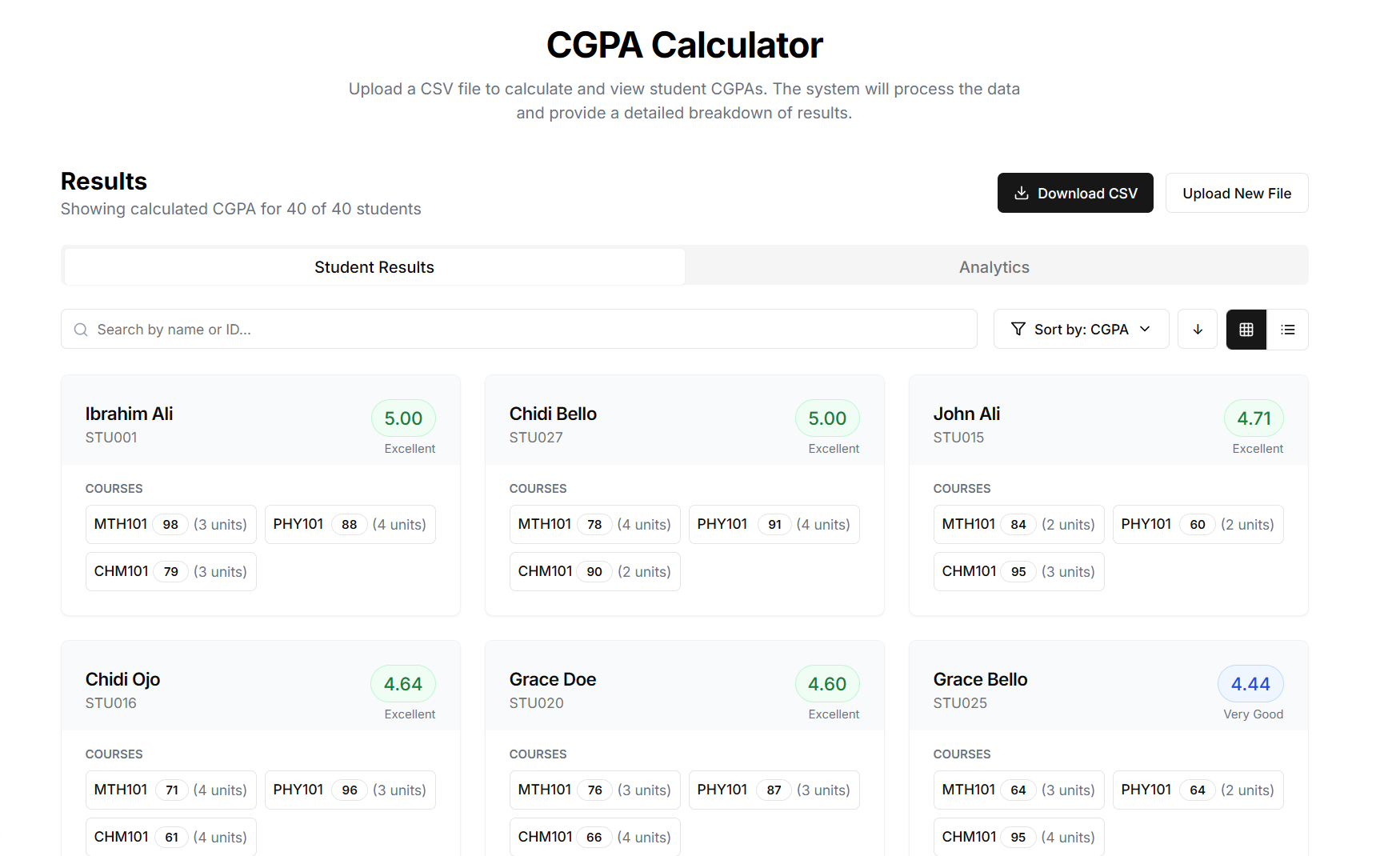
- Dual display modes: card view and table view
- Search and sorting functionality
- Responsive design for mobile and desktop
- Analytics dashboard with average CGPA metrics
Challenges & Solutions
- Parsing and validating dynamic CSV data with multiple grade/unit pairs
- Ensuring consistent CGPA calculations across varied input formats
- Managing temporary file storage and cleanup
- Designing a minimalist and intuitive UI for both views
- Handling real-time downloads with server-side cleanup
System Architecture
Overview
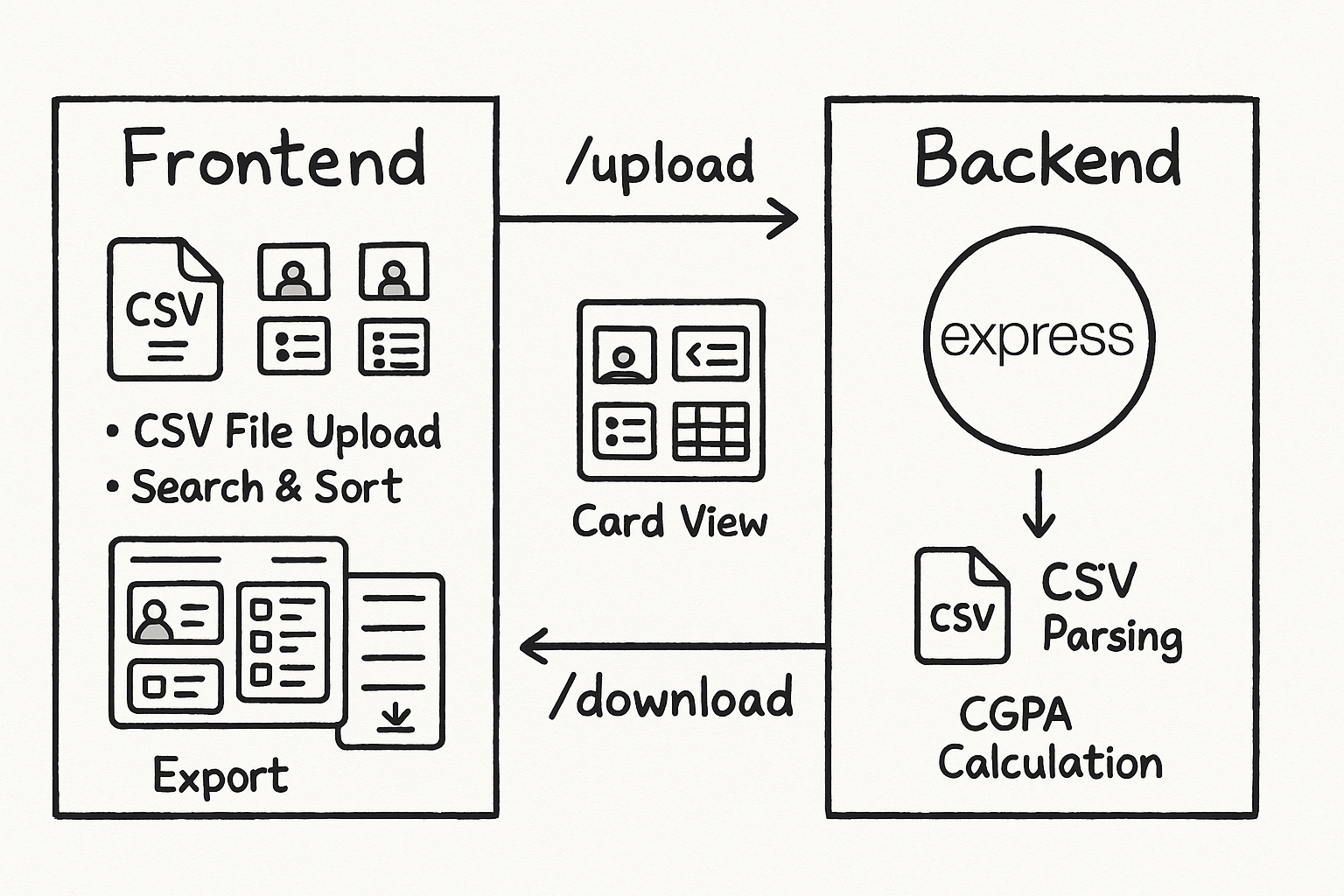
The CGPA Calculator system is divided into two major components:
- Frontend: A minimalistic black-and-white user interface that supports file uploads, data visualization, and interaction.
- Backend: An Express.js server that processes uploaded data and returns enriched results.
Backend Architecture (Express.js)
-
API Server:
- Built with Express.js
- Handles routes for file upload and file download
-
File Upload & Processing:
- Accepts CSV files using Multer middleware
- Parses CSV files into JSON objects
- Iterates through each student's record to calculate CGPA:
- Uses a mapped grading logic:
- 70–100 → 5 points
- 60–69 → 4 points
- 50–59 → 3 points
- 45–49 → 2 points
- 40–44 → 1 point
- 0–39 → 0 point
- Computes total weighted grade points and divides by total units
- Adds computed cgpa to each student record
- Uses a mapped grading logic:
-
CSV Output:
- Enriched data is converted back to CSV format
- File is saved temporarily for download
- Auto-deletes the file after it has been downloaded
Frontend Architecture
-
Upload Interface:
- Drag-and-drop CSV upload
- Initiates request to
/api/v1/cgpa/upload
-
Views:
- Card View: Displays student records in a stylized card layout
- Table View: Tabular format for detailed inspection
-
Interactions:
- Search functionality to filter records by name/matric number
- Sorting options (ascending/descending CGPA)
- Download button triggers CSV export from
/api/v1/cgpa/download/{filename}
-
Responsiveness:
- Optimized for mobile and desktop
Data Flow Summary
- User uploads a CSV file from the frontend
- Backend parses and processes data, calculates CGPA
- Backend sends enriched data and downloadable CSV link
- Frontend displays data in selected view and allows export